Cross stitch guide
How to make a cross stitch pattern
A cross stitch pattern is a grid with one square for every stitch. You can make your own in three ways: draw it square by square, convert a picture, or chart a name or saying. All three can be done here, free, in your browser.
On this page 8 parts
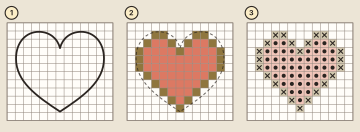
Way 1: draw it on a grid
Good for small motifs, borders and anything with clear shapes.
- Start small. A simple shape with broad areas and little fine detail makes a good first chart.
- Get a grid. On paper, print graph paper: 10 squares to the inch (2.54 cm) is roomy enough to draw on. On screen, open the pattern maker and choose a size.
- Draw the outline (1). Sketch it lightly over the squares, or trace it from a drawing of your own.
- Turn the line into squares (2). Follow the outline round and fill the squares that lie along it. A stitch is a whole square, so every curve becomes small steps. Use pencil, so you can rub out and try again.
- Color it. One colored pencil for each thread on paper, or one thread for each color on screen.
- Give each color a symbol (3) and list the symbols in a key.
In the pattern maker the chart can be 8 to 160 squares each way. You draw, erase and fill with a finger or a mouse, drag out straight lines and boxes, and move, mirror or turn a group of stitches. Threads are picked from 388 DMC numbers by number or by color name. "Download PDF" then does step 6 for you: a paged chart with symbols, a thread key and the fabric size to cut. To flip a whole design so that it faces the other way, see how to reverse or mirror a pattern.
Way 2: convert a picture
Good for photos, drawings and logos.
- Open the photo to pattern converter and choose a picture: a JPG, PNG or WebP. It is read on your own device and is not uploaded.
- Set the size: the longest side, in stitches.
- Set the most thread colors you want. The chart uses fewer if the picture holds fewer.
- Look at the preview, change the settings until it reads well, and download the PDF.
A close-up subject on a plain background charts best. Fewer colors give a calmer chart but hold less detail. Small pixel art is charted exactly, one pixel to one stitch. Use pictures you took or made yourself, or have permission to use.
Way 3: chart a name or a saying
Type the words into the text generator, pick one of five letterings, and it draws the chart to fit them. How to cross stitch letters and words covers spacing and centering.
Choose the size, the count and the colors
- Size comes first. Decide how big the finished piece should be, then multiply by the fabric count to get stitches. A space 4 inches (10.2 cm) wide on 14 count holds 56 stitches. The fabric calculator, opened on 56 by 56 stitches, shows the size on every count.
- More stitches hold more detail. If the design looks too blocky, give it more squares, or plan it for a finer fabric that fits more stitches into the same space.
- Keep the colors few. Each extra color is another thread to buy.
- Know where it is going. A design for a card or a coaster has to fit that opening, so measure the space before you draw.
Check the chart before you stitch
- Read the size on the cover of the PDF and make sure your fabric is big enough, with a margin all round.
- Look for single stray stitches of a color, far from the rest. The converter's "Tidy stray stitches" setting removes them.
- Hold the real threads together. Colors on a screen are only close matches.
Cross stitch without a pattern
Counted cross stitch is worked on plain cloth, so something has to tell you where the stitches go. If you do not want to follow a chart, there are two ways round it. Stamped cross stitch has the design printed on the cloth, and you stitch over the print. Or make the chart yourself: draw a small motif in the pattern maker, and then the design is truly your own.
Common mistakes
- Too much detail for the size. A small face in a big picture will not have enough stitches to be a face. Make it bigger or simpler.
- Too many colors. A chart with fewer colors is calmer to look at and cheaper to stitch.
- Forgetting the margin. The cloth must be larger than the design.
Where to go next
How to resize a pattern explains how the fabric count changes the finished size. Cross stitch software and apps lists what each tool here does on a phone, a tablet and a computer. Or start now in the pattern maker.